Media keys or F1–F12
By default the top row controls playback and volume, and Globe or Fn plus a top-row key sends F1–F12. Turn off Media keys on F-row in Tenon to make F1–F12 the default.
Set up the function row →Tenon adds media keys, an F1–F12 option and Command shortcuts to supported Magic Keyboards.
All USB-C and 2021 Lightning models · Bluetooth or USB
Windows 11 or Windows 10 22H2, x64
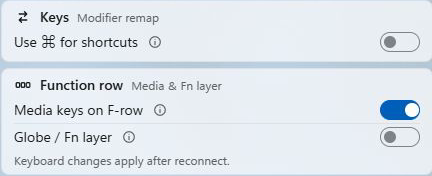
By default the top row controls playback and volume, and Globe or Fn plus a top-row key sends F1–F12. Turn off Media keys on F-row in Tenon to make F1–F12 the default.
Set up the function row →“Use ⌘ for shortcuts” is on by default: Command sends Control, so ⌘C and ⌘V copy and paste in Windows apps. With it on, no key sends the Windows key by itself; turn the setting off to use Command as the Windows key.
Set up Command shortcuts →Tenon shows the keyboard’s charge in the app and the system tray. The supported Lightning keyboards report battery over Bluetooth and USB. For USB-C keyboards, only the model with both Touch ID and a numeric keypad reports battery, over USB. Battery status stays free.
Keyboard controls are a Pro feature. See what is included with Tenon. For brightness-key behavior and setup help, use the function-key troubleshooting guide.
Earlier Magic Keyboards and non-US layouts are not supported yet.
See model and Windows requirements →Yes. A Magic Keyboard types on Windows once it is paired over Bluetooth or connected with a USB data cable. Tenon does not run on Windows on ARM or 32-bit Windows.
No. Touch ID fingerprint sign-in is not supported. The supported Touch ID keyboards still work with Tenon's key controls.
No. The Use ⌘ for shortcuts setting applies to the Magic Keyboard alone; other keyboards keep their usual keys.