Fix Magic Keyboard function keys on Windows
If the keyboard types but the volume and playback keys do nothing, set up the function row in Tenon. You can then choose whether the top keys control media or send F1–F12.
Set up the keys in Tenon
If the keyboard does not type yet, start with the Bluetooth and USB connection guide.
- Connect the keyboard and install Tenon. Connect your supported Magic Keyboard over Bluetooth or a USB data cable. Install Tenon, then open the app. If you already use Tenon, install the current version from the download page or check for updates in the app.
- Open the Function row settings. Select Magic Keyboard in Tenon. Under Function row, turn on Globe / Fn layer so Tenon can provide the media controls.
- Choose what the top row does. Turn on Media keys on F-row for volume and playback without holding Fn. Turn it off if you prefer F1–F12 by default. With Globe / Fn layer on, holding the Globe or Fn key gives you the other behavior.
- Reconnect and try the keys. Reconnect the keyboard after changing its settings: unplug and reconnect the USB cable, or switch the keyboard off and on for Bluetooth. With Media keys on F-row on, try F11 and F12 for volume, then F8 while audio is playing for play/pause.
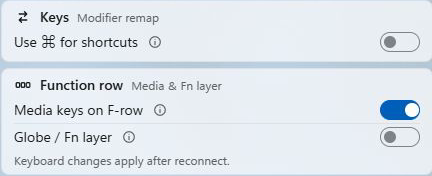
F1–F12 or media keys: choose your default
Media keys on F-row sets the default for the top row:
| Media keys on F-row | Press the top row | Hold Globe / Fn |
|---|---|---|
| On | Media controls | F1–F12 |
| Off | F1–F12 | Media controls |
For example, with media keys on, F12 raises the volume and Globe / Fn + F12 sends F12 to the current app. Turning off Globe / Fn layer leaves the top row as ordinary function keys.
If a key still does not work
The top row only sends F1–F12
Check that both Globe / Fn layer and Media keys on F-row are on, then reconnect the keyboard. If the settings are locked, check your plan in Tenon’s Account screen; keyboard controls are a Pro feature.
Volume works, but brightness does not
Brightness also depends on your display. Try Settings → System → Display in Windows. An external monitor may need its own brightness buttons; see Microsoft’s display-brightness guide.
The keyboard does not type, or disappears from Tenon
Check its connection first. For USB, use a data cable and keep the keyboard switched on. For Bluetooth, follow the connection guide. If it still fails, contact support with your keyboard model, Windows version, connection type and the keys that do not respond.
Frequently asked
How do I use F1–F12 instead of media keys?
In Tenon, select Magic Keyboard and turn off Media keys on F-row. Leave Globe / Fn layer on if you want to hold Globe or Fn for volume and playback. Then reconnect the keyboard.
Do I need to pair the keyboard again after changing these settings?
No. Reconnecting is enough: switch the keyboard off and on for Bluetooth, or unplug and reconnect its USB cable. You do not need to remove an existing Windows pairing.
Does this work over USB as well as Bluetooth?
Yes. All supported keyboards work over Bluetooth or a USB data cable.