Two- and three-finger swipes
On the USB-C trackpad, swipe with two fingers for back and forward. Swipe with three fingers left or right to switch desktops, up for Task View, or down to show the desktop.
Tenon adds multi-finger gestures, tap-to-click and a Click firmness setting to the USB-C Magic Trackpad. Lightning Magic Trackpad 2 supports scrolling, clicking and dragging. Both models connect over Bluetooth or USB.
Requires an x64 PC with Windows 11 or Windows 10 22H2. Windows on ARM is not supported.
Guides: connect it · gestures by model · compare to Magic Utilities
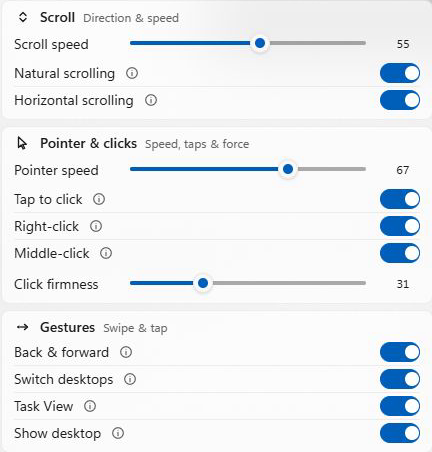
On the USB-C trackpad, swipe with two fingers for back and forward. Swipe with three fingers left or right to switch desktops, up for Task View, or down to show the desktop.
The USB-C trackpad supports tap-to-click, two-finger right-click, three-finger middle-click and pressure-based clicking. Set Click firmness in Tenon.
Two-finger scrolling and pointer control on both supported models, with scrolling direction and speed settings.
The USB-C trackpad reports its battery only over Bluetooth. Before installing, check your exact model on the supported-device list. Tenon uses its own gesture engine, so Windows Precision Touchpad settings do not apply: set the built-in gestures in Tenon. Custom gesture mappings are not available.
Gestures, tap to click and scrolling are Pro features. Pro is US$50 a year or US$90 for two years. The 30-day trial comes first and works without an account or card. After the trial, the pointer and pressing to click keep working, and battery and connection status need no subscription. See Pro pricing.